
Adding video to a product used to mean wiring up a player and hoping for the best. When something broke for a viewer in Manila or Berlin, your only signal was a support ticket two days later. Streaming analytics changed that. A small beacon in the player reports startup time, rebuffering, and video quality back to a dashboard, and you finally know whether your video stack actually works.
Three serious tools have emerged for developer teams that need this telemetry: FastPix Video Data, Mux Data, and Bitmovin Analytics. This article compares them honestly. Each has a sweet spot, and the right pick depends less on the metrics they track (which overlap heavily) and more on how they fit your stack and budget.
TL;DR:
| Tool | Best For | Pricing |
|---|---|---|
| FastPix Video Data | Teams that want analytics included in their video stack | Free up to 100K views/mo, then pay-as-you-go |
| Mux Data | Teams running on any player who can absorb a fixed monthly tier | $499/mo Media plan, $0.50 per 1K extra views |
| Bitmovin Analytics | Teams already on Bitmovin Player and Encoder | Custom enterprise, often bundled |
For most developer teams, FastPix Video Data is the simplest entry point. It works with any player, ships under the same SDK as FastPix Video, and the free tier is generous enough to validate in production. If you need the deepestcustom-dimension and exports tooling and have the budget, Mux Data is the reference.If you already run theBitmovin stack, their bundled analyticsremoves a second integration.
What is video streaming analytics, and why it is different from AI video analytics
Search "best video analytics tools" and most results are about AI video analytics for surveillance: detecting objects in a CCTV feed, counting people in a parking lot, flagging suspicious behavior. That category solves a different problem than the one this article is about.
Video streaming analytics measures how a video plays back for real viewers. The data points are: startup time, rebuffering ratio, playback failure rate, video quality scores, and bitrate adaptation. The audience is viewers watching real content, and the buyer is a video engineer or platform PM debugging QoE.
AI video analytics analyzes the visual contents of a video. The audience is security teams, retail operations, and traffic engineers. Tools like Google Cloud Video Intelligence, Coram, Lumana, and Avigilon belong to this category.
Both are valid. They are not substitutes for each other. The rest of this article is about the streaming analytics category.
How to choose a video streaming analytics tool
Five criteria shape the decision:
QoE metrics covered. All three tools track startup time, rebuffering, and playback failures. Differences show up in custom dimensions, real-time alerting, and how each platform scores video quality. Teams running A/B tests on player versions or CDN routes need custom dimensions. Teams running live events need real-time over batch.(three tools diff)
Player-agnosticism. A tool that only works with one player locks you in. FastPix Video Data and Mux Data both ship player-agnostic beacons that drop into any HTML5 video element, AVPlayer, or ExoPlayer. Bitmovin Analytics is optimized for the Bitmovin Player.
Pricing model. Three patterns exist: included free up to a view threshold, paid subscription tier, or bundled with another product. Total cost depends on view volume, retention period, and number of custom dimensions. Cheap base rates can invert once you add custom dimensions or longer retention.
Integration depth. Beacon SDK coverage matters. Web, iOS, Android, React Native, Roku, Chromecast, smart TV. The narrower the SDK list, the more platforms you have to instrument yourself.
Bundling with the rest of the stack. If you already use a video platform's encoder and player, that platform's analytics is one less integration. If you run on multiple platforms, a player-agnostic tool that sits above them all wins.
A typical streaming analytics workflow
Streaming analytics is a beacon-and-pipeline architecture. The player emits events, the analytics service ingests and aggregates them, and dashboards plus alerts surface the signal.
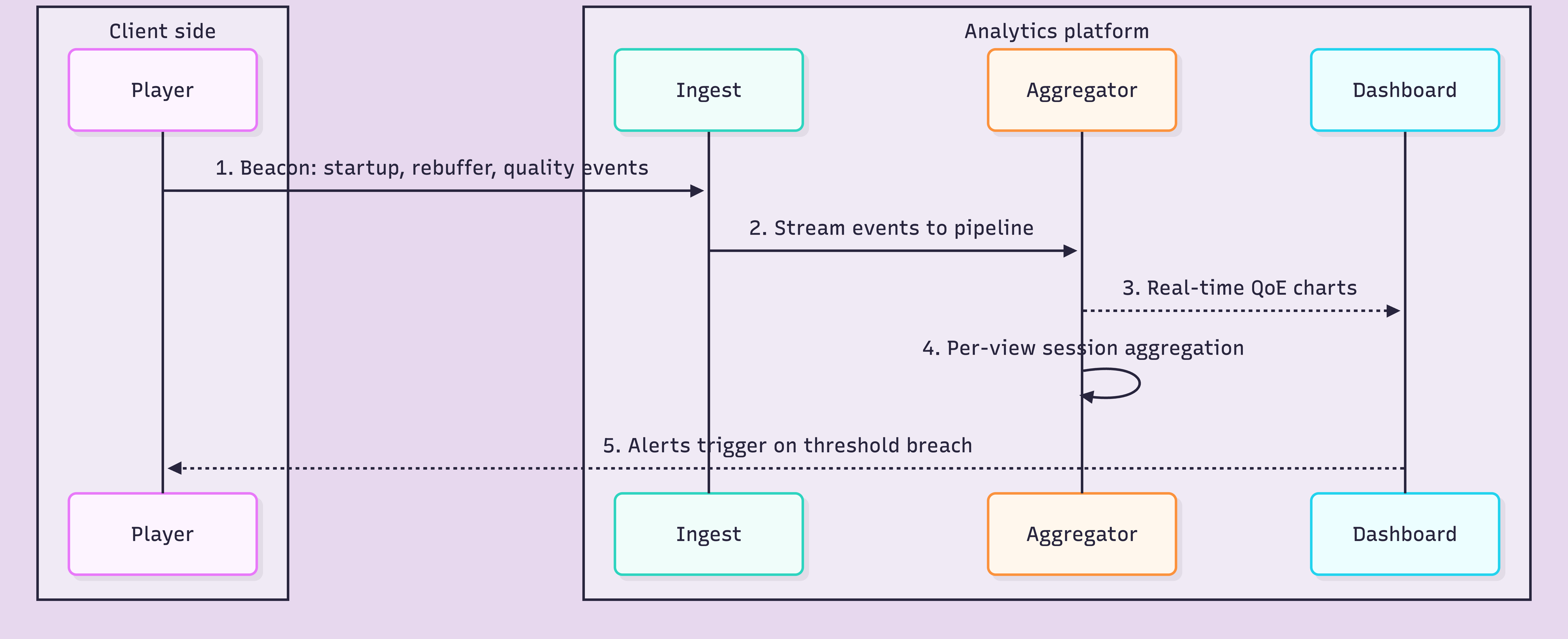
This pattern is the same across FastPix Video Data, Mux Data, and Bitmovin Analytics. The differences are in beacon SDK coverage, pipeline latency, and what you can do with the aggregated data.
The 3 best video streaming analytics tools
1. FastPix Video Data, best for teams that want analytics included in their video stack
FastPix Video Data ships as part of the FastPix platform and is free for all users up to 100,000 streaming views per month. Beyond that threshold, pricing scales linearly. The same SDK that talks to FastPix Video also reports playback telemetry, which means analytics is one less integration when FastPix runs the stack.
Coverage: 50-plus playback data points per view session. Startup time, rebuffering ratio, playback failure rate, audience metrics, play metrics, and stream metadata. Real-time monitoring dashboard with REST API access. Beacon SDKs for web, iOS, Android, and React Native.
Pricing: Free up to 100,000 views/month for all users. Pay-as-you-go beyond. No card required to start.
Best for: Teams running FastPix Video, and player-agnostic teams that want a free QoE tier without committing to a paid subscription.
Try FastPix Video Data on your existing player. Sign up for FastPix and get $25 in free credits.
2. Mux Data, best for teams running on any player who can absorb a fixed monthly tier
Mux Data is a long-standing player-agnostic QoE platform with one of the broader beacon SDK lists in the category, spanning web, iOS, Android, React Native, Roku, and Chromecast. The Viewer Experience composite score is a Mux Data signature.
Coverage: QoE metrics, custom dimensions (up to 5 on the Media plan), Viewer Experience score, monitoring dashboard, CSV exports, streaming data exports.
Pricing: Self-service Media plan at $499/month, includes 1 million monitoring views and up to 5 custom dimensions. Additional views at $0.50 per 1,000.
Best for: Teams that run on any player, want broad SDK coverage including Roku and Chromecast, and can absorb a fixed monthly tier.
3. Bitmovin Analytics, best for teams already on Bitmovin Player and Encoder
Bitmovin Analytics is bundled into the Bitmovin product family. If your team uses the Bitmovin Player and Encoder, analytics is built in and the integration is zero work. Bitmovin Analytics tracks the same QoE metrics as the other two but optimizes for teams running the full Bitmovin stack.
Coverage: QoE metrics, bitrate adaptation analytics, ad analytics, custom dimensions, alerting. Strongest when paired with Bitmovin Player.
Pricing: Custom enterprise quotes, often bundled with a Bitmovin Player or Encoder contract. No public self-serve tier.
Best for: OTT and broadcast teams already on Bitmovin Player and Encoder, where bundled analytics removes a second integration.
At-a-glance comparison
| Capability | FastPix Video Data | Mux Data | Bitmovin Analytics |
|---|---|---|---|
| Free tier | ✓ Up to 100K views/mo | ✗ | Tied to Bitmovin Player tier |
| Pricing beyond free | Pay-as-you-go per view | $499/mo Media plan, $0.50 per 1K views | Custom enterprise, often bundled |
| Player-agnostic | ✓ Any player | ✓ Any player | Optimized for Bitmovin Player |
| Real-time QoE | ✓ | ✓ | ✓ |
| Custom dimensions | ✓ | ✓ | ✓ |
| Beacon SDKs | Web, iOS, Android, React Native | Web, iOS, Android, React Native, Roku, Chromecast | Web, iOS, Android, Roku, smart TV |
| Bundled with video API | ✓ | ✗ | ✓ |
| Free credits to start | $25 | None | Contact sales |
FastPix Video Data: getting started
You can be capturing QoE telemetry in production in under an hour. The beacon SDK works with any HTML5 video, AVPlayer, or ExoPlayer setup. You do not swap your player or your CDN. Five steps:
Step 1: Create a FastPix account and copy your workspace key
Sign up at fastpix.io. From the dashboard, open Video Data, then Settings, and copy your workspace key. This is what authenticates beacon events from your player back to your account.
Step 2: Install the beacon SDK in your player
Install via npm for web, CocoaPods for iOS, or Maven for Android. The SDK attaches to an existing player instance, no rewrite required.
1FastPixData.init(player, {
2workspace_key: 'YOUR_WORKSPACE_KEY',
3player_name: 'web_player_v2',
4video_id: 'asset_123',
5video_title: 'Q3 earnings call',
6viewer_id: 'user_42'
7});
Step 3: Pass viewer and video metadata
The keys you pass during init become the dimensions you can filter by in the dashboard: video_id, video_title, viewer_id, player_name, plus up to 5 custom dimensions. Pass the ones you will actually slice the data by.
Step 4: Verify events in the dashboard
Reload your player and open Video Data, then Live Views in the FastPix dashboard. Your session shows up within seconds, with startup time, rebuffering ratio, and video quality already populating.
Step 5: Set alerts on QoE thresholds
Configure alerts on the metrics that matter: rebuffering ratio above 2%, startup time above 3 seconds, playback failure rate above 0.5%. Alerts fire to Slack, email, or a webhook of your choice.
Sign up for FastPix and start capturing QoE data today. Free up to 100K views/month, $25 in credits, no card required.
FAQ
What is video streaming analytics?
Video streaming analytics measures how video playback performs for real viewers. These tools track QoE metrics such as startup time, rebuffering ratio, playback failures, and video quality levels. This differs from AI video analytics, which focuses on analyzing the actual contents of a video using computer vision models.
What is the best video streaming analytics tool for developer teams?
FastPix Video Data, Mux Data, and Bitmovin Analytics are among the most widely used options for developer-focused teams. FastPix Video Data is well suited for teams that want analytics bundled into the same video stack with no additional cost up to 100,000 views per month. Mux Data is a common choice for teams using multiple players and infrastructure layers. Bitmovin Analytics is often preferred by organizations already running on the Bitmovin ecosystem.
What is the difference between Mux Data and FastPix Video Data?
Both platforms track core QoE metrics such as startup time, rebuffering ratio, playback failures, and video quality performance. The main differences are pricing and integration structure. FastPix Video Data is free up to 100,000 views per month and ships within the same SDK ecosystem as FastPix Video. Mux Data is sold separately and starts at $499 per month for the Media plan.
Can I use streaming analytics without switching video platforms?
Yes. FastPix Video Data, Mux Data, and Bitmovin Analytics are all player-agnostic. Each provides beacon SDKs that integrate into web, iOS, and Android players independently of the underlying video infrastructure. This allows teams to add analytics without replacing their current streaming platform.
Is video streaming analytics the same as Google Cloud Video Intelligence?
No. Google Cloud Video Intelligence focuses on analyzing the visual contents of videos using AI and computer vision. Video streaming analytics measures playback quality and viewer experience for real users. The two technologies solve different problems and are generally used by different teams.