Let’s say you’ve been asked to build something like TikTok, Instagram. Or maybe it’s an education platform with short video lessons. Either way, people need to upload videos. Other people need to watch them. And you need to make it all work.
If you're using Node.js, it’s a solid choice for building APIs, managing queues, and connecting services.
But here’s the part that’s usually missing from the “just build it” conversation:
video is its own system.
We’ll walk you through how short video apps actually work, not just frontend logic, but the full backend pipeline:
- How to structure your Node.js backend
- How to run background jobs for encoding and thumbnails
- How playback is delivered (smoothly)
- How to monitor performance and optimize viewer experience
You’ll learn:
- What your short video app needs to support
- What you’ll be building with Node.js and what tool you can use
- What handling video “manually” actually involves
- And how FastPix can fits in.
By the end, you’ll have a clear picture of the full stack, and a much faster way to get it working in production.
TL;DR
Building a short-video app with Node.js means more than handling APIs and databases, video introduces its own complex system of uploads, encoding, playback, analytics, and moderation. While you can assemble this stack yourself using tools like FFmpeg, HLS packagers, CDNs, and monitoring pipelines, doing so requires significant infrastructure, engineering time, and ongoing maintenance.
FastPix simplifies this by providing a unified video API and Node.js SDK that manages the full video lifecycle from upload and encoding to playback, analytics, and content safety while your backend focuses on business logic, feeds, and user experience. The result is a faster path to production, fewer moving parts, and a scalable video pipeline that fits naturally into your existing Node.js architecture.
What your short video app needs to support?
A short video app has a lot going on under the hood.
Yes, you’ll use Node.js for the backend. But beyond routing and databases, here’s what you’re really signing up to support:
- Large uploads: Users will send big video files from mobile. You’ll need to upload directly to cloud storage using signed URLs or a video API.
- Transcoding: It prepares your MP4 into multiple bitrates and segments, enabling adaptive streaming, broad device support, fast start times, CDN delivery, and features like encryption and low-latency playback.
- Adaptive playback: Use HLS or DASH to generate manifest files and video chunks. Add playback tokens if you need access control.
- Metadata tracking: You’ll store info like user IDs, upload status, encoding progress, views, and moderation flags in your database.
- Background jobs: Encoding, thumbnails, NSFW checks, these can’t run on the main thread. Use queues, workers, and webhooks.
- Video feed: Your app needs a scrollable, fast-loading feed. That means pagination, sorting, filtering, and smart API endpoints.
- Playback analytics: Track buffering, drop-offs, watch time, and completion rates. This data helps you measure quality of experience (QoE), catch issues early, and flag videos that may need moderation or fixes.
This is the baseline.
Some apps start with just uploads and playback. But most of these building blocks show up sooner than you think. Understanding the full scope early means you won’t have to rip it apart later.
What you’ll build with Node.js and the tools that help
Short video apps aren’t just “upload and play.”
Your backend needs to do a lot more, and Node.js is a solid fit for wiring it all together.
Here’s what your backend is responsible for, and which open source tools can make that faster to build:
| Area | What you're building | Tools that work well |
|---|---|---|
| APIs | Endpoints like /upload-token, /feed, /like, /webhook | Express (simple) or NestJS (modular) |
| Authentication | Sign-in, token-based auth, user roles | Auth.js, Clerk, Supabase, firebase |
| Database | Storing users, uploads, view counts, flags, metadata | PostgreSQL + Prisma ORM or any of your choice |
| Background jobs | Handling encoding updates, webhooks, AI tagging, thumbnails | Redis + RabbitMQ for queues |
| Feed logic | Trending or personalized scrollable feeds | SQL + Redis + Meilisearch |
| Moderation tools | Dashboards to flag, remove, or review content | Retool, Directus (optional for internal use) |
| Observability | Monitoring, error tracking, performance | PostHog, Grafana, Sentry |
Your Node.js backend becomes the glue coordinating APIs, queues, feeds, and data.
And with these open source tools, you avoid rebuilding the basics from scratch.
The part where things get video-heavy
There are two ways to approach video infrastructure:
Option 1: Stitch everything together yourself, FFmpeg for encoding, Shaka Packager for HLS, NGINX for delivery, secure token logic, OpenTelemetry for metrics, plus your own SDKs and retries for uploads.
Option 2: Use a video API that handles those layers for you.
FastPix fits into the second path. It doesn’t replace your backend, it simplifies the parts that are deeply video-specific and time-consuming to build from scratch.
Here’s where FastPix helps:
| What you need | What it involves | With FastPix |
|---|---|---|
| Uploads | Chunked uploads, retries, mobile handling | Upload API and SDKs |
| Transcoding | FFmpeg workflows, multiple renditions, fallbacks | Just-in-time encoding |
| Playback delivery | HLS/DASH manifests, ABR packaging, CDN readiness | Stream-ready URLs + secure tokens |
| Secure access | Signed tokens, expiry rules, user-level protection | Tokenized playback |
| Viewer analytics | Track QoE, buffering, drop-off, engagement | Built-in Video Data SDK |
| Moderation workflows | NSFW filters, AI tagging, transcription | Optional AI pipelines |
| Live-to-VOD or clipping | Record live streams, generate highlights, trim segments | Prebuilt APIs |
How it all fits together
Think of your architecture in three parts:
- Frontend app – React Native, Flutter, or Web. Sends uploads and plays videos via FastPix
- Node.js backend – Handles API calls, queues, auth, and feed logic
- FastPix – Handles all the heavy video lifting: uploads → encoding → playback → analytics → moderation
Now if you still want to build it all yourself, we’ve covered that too in the next section.
What handling video yourself actually looks like?
Let’s say you decide to build the video stack yourself, no video API, no managed service.
Here’s what that means in practice:
First, you’ll need to accept large video uploads from mobile devices. These uploads will vary in size, duration, and format. They might time out. You’ll have to deal with retries, file corruption, and edge-case bugs from slow networks or older browsers.
Once the file reaches your server, you’ll need to process it. That usually means running ffmpeg to transcode the video into multiple resolutions 1080p, 720p, 480p so you can support adaptive playback. But encoding isn’t lightweight: it’s CPU-intensive, especially if several users upload videos at once. You'll likely need a queue system like BullMQ just to keep things from falling over.
Then there’s packaging. Adaptive streaming protocols like HLS or DASH require segmenting the video into tiny chunks, usually 2–6 seconds each, and generating manifest files that tell players how to switch between bitrates. You’ll need to store and serve these files correctly, and deal with CDN caching rules to make sure playback actually works on every device.
You also need to secure playback. That means writing your own token logic: signed URLs with expiration windows, referrer validation, and possibly user-agent restrictions so the video can’t be ripped and shared freely.
Now you’ll need a player. Most teams grab a JavaScript player like Hls.js, Video.js or Shaka Player, but integrating it across web, iOS, and Android takes time and each one has quirks. Safari handles HLS differently than Chrome. Android’s WebView may behave differently than Chrome on Android.
And then there’s observability. You’ll want to track how the video is performing: did it buffer? Did the user finish it? Did they drop off after 3 seconds? You’ll need to build those metrics pipelines and dashboards yourself or run a third-party analytics tool alongside your stack.
Finally: scaling. What happens when 100 people upload videos at once? What happens if your encoding queue gets backed up? What if you serve 10,000 videos tomorrow and your S3 bill triples overnight?
These are solvable problems but they require infrastructure, monitoring, and time. And they’ll take focus away from everything else you're building.
If you’re not planning to build the video stack yourself
You’ve got plenty to focus on already auth, feeds, personalization. So unless you really want to maintain a transcoding pipeline and HLS origin setup, it probably makes sense to hand off the video part.
That’s where the FastPix Node.js SDK comes in. It gives you just enough control to keep everything integrated into your backend, without pulling you into infrastructure land.
Upload, encode, and stream all from your Node.js SDK
Instead of writing custom fetch calls or juggling payloads, the SDK gives you a simple interface for core video actions:
- Trigger encoding from an S3 or R2 URL
- Track processing status
- Update video metadata
- Create secure playback IDs
1npm install @fastpix/fastpix-node
1const FastPix = require("@fastpix/fastpix-node").default;
2
3const fastpix = new FastPix({
4  accessTokenId: process.env.FASTPIX_TOKEN_ID,
5  secretKey: process.env.FASTPIX_SECRET_KEY,
6});
To ingest a video:
1const response = await fastpix.uploadMediaFromUrl({
2  inputs: [{ type: "video", url: fileUrl }],
3  metadata: { title: "My test upload" },
4  accessPolicy: "public", // or "signed"
5});
To get a playback ID:
1const playback = await fastpix.mediaPlaybackIds.create(response.data.id, {
2  accessPolicy: "public",
3});
From there, just store videoIdandplayback_id in your DB and return them in your /feed API.
Support live video without extra infrastructure
The same SDK lets you manage live streams too:
- Create and monitor stream sessions
- Control access with playback policies
- Enable simulcast to platforms like YouTube or Twitch
You still handle routing and UI, FastPix takes care of ingest, transcoding, and delivery.
To understand the process in more detailed go through our docs and guide
Where this fits into your stack
Your app stays fully in control. You still build:
- Upload token APIs
- Feed endpoints
- DB schema for users/videos
- Background jobs or webhooks
FastPix just replaces the part where you’d otherwise:
- Write FFmpeg jobs
- Set up HLS packaging
- Handle secure playback tokens
- Build a monitoring layer
It’s still your app, just with the video part abstracted into a clean SDK that fits the Node.js ecosystem.
Note:And while this guide uses Node.js, FastPix also supports SDKs for other languages, Python, Go, PHP, Ruby, C#, and more so you can build in the stack that works best for you.
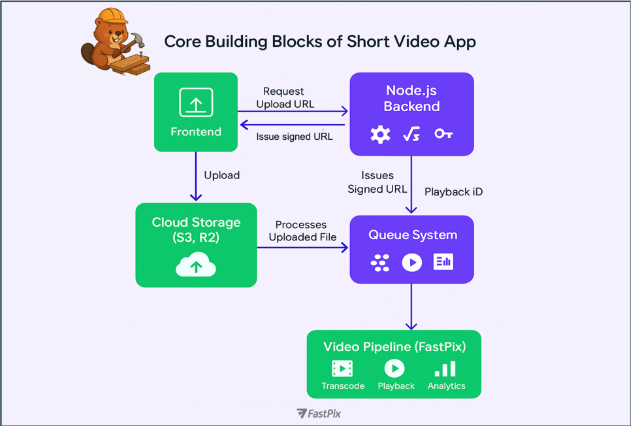
The flow: upload → process → playback
Here’s what the video flow looks like when you use FastPix from the moment a user records a video to when it shows up in someone else’s feed:
1. Frontend (Web or Mobile): A user selects or records a video. The app hits your backend for an upload token.
2. Node.js Backend: Your /upload-token route returns a presigned URL or sets up a direct upload using the FastPix Upload SDK, which handles chunked uploads, retries, and edge cases on mobile.
3. Storage: The video uploads directly to your cloud storage (like S3 or R2). Once done, your background worker picks it up.
4. FastPix Ingest: Using the FastPix Node.js SDK, your backend sends the file URL to FastPix.
FastPix takes care of:
- Encoding into multiple resolutions
- Packaging into HLS (with ABR)
- Generating thumbnails, chapters, and metadata if needed
5. Processing status: You can either poll for status or receive a webhook from FastPix when processing is complete.
6. Playback ready: Your backend fetches the playbackId and stores it alongside the video’s metadata in your database.
7. Feed delivery: Your /feed route returns a list of videos, each with a playbackId, sorted however you like (recency, trending, etc.).
8. Playback: On the frontend, videos can be played using:
- A native video player (using FastPix’s secure streaming URL), or
- A FastPix Player SDKavailable forWeb, Android, and iOS
Content safety and everything else your video pipeline should handle
When building a short video app, this is the part no one warns you about.
User uploads = risk.
Some videos take off before anyone’s had a chance to review them. That’s the risk with UGC when content moves fast, moderation has to move faster.
FastPix lets you build that into your flow. Every upload is scanned during processing. You get a confidence score for NSFW content, and can trigger a webhook if something needs a second look before it reaches your audience. Go through the guides to understand it better.
But moderation is only one part of the transformation story.
You can also add outros when users download a clip. Watermark videos before they go live. Auto-generate GIFs for your feed. Replace audio, subtitles, trim highlights, all while the video is being processed. To know more on what else you can transform, go through our features section.
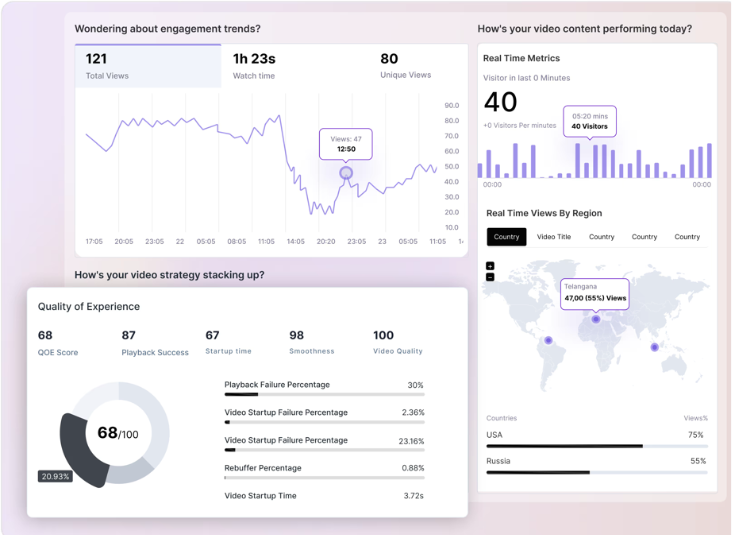
Now your streaming works but can you see what viewers actuallyexperience?
Most UGC platforms want to catch risky content before it spreads too fast. If a video starts gaining traction unusually quickly, it’s often flagged for human review, just to make sure it’s safe before reaching a larger audience.
With the FastPix Video Data SDK, you can build that logic directly into your app.
Track view spikes, drop-offs, completions, and playback patterns, then route specific videos for moderation based on real-time data. No need to wire up custom events or bolt on third-party trackers.
It’s all built in, and fully customizable to your platform’s trust and safety needs.
Final words
You’ve got the APIs, the database, the background jobs, the core app is yours. But video? That’s a whole different system. FastPix gives you the full pipeline uploads, encoding, playback, analytics all in one SDK.
If you want to see how it fits into your stack, sign up and try it out. Or talk to us we’re happy to help.